
The next major version of Vanilo is 6.0, and it has been released on September 25th, 2026.
This release brings several features and improvements, including non-product line items, Laravel 13 support, taxon improvements, and EU Order Withdrawal support.
Additionally, it includes a variety of enhancements and bug fixes.
Supported Versions
- PHP 8.3 support has been removed; PHP 8.4 & 8.5 are supported
- Laravel 12 is still supported, but v12.61.1 is minimally required
- Laravel 13 is supported from v13.12 and upwards
Non-product Line Items
Until now, Vanilo segregated products into cart/order items while relegating secondary charges—such as shipping fees, handling surcharges, gift wrapping, or specialized service fees—to order-level adjustments.
While adjustments work for many cases, it has several limitations. The most important one is that Vanilo's Tax module can't calculate taxes on adjustments, only for line items.
Additionally, certain businesses treat certain non-product items as true billable items, which can't be represented as adjustments. This may cause friction across integrations: ERPs, fulfillment systems, and third-party tax engines that require line-level taxation.
Starting with Vanilo v6.0, the framework introduces first-class architectural support for Non-product Line Items.
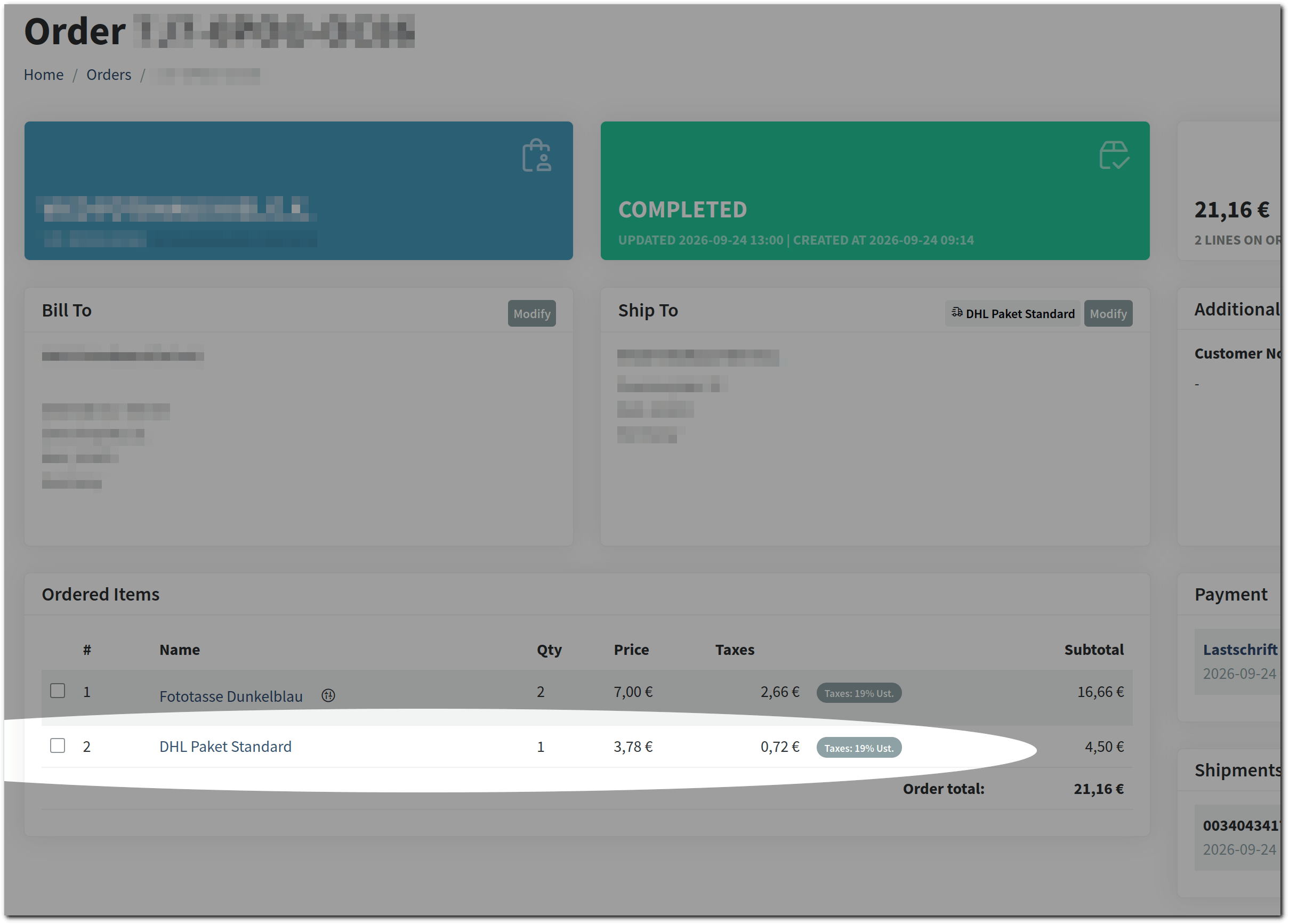
By enabling non-product entities to act as buyable line items, systems achieve maximum data fidelity, eliminate conversion overhead between cart and ERP payloads, and unlock granular per-item tax classification.
LineItem Interfaces
The following interfaces were introduced: LineItem, LineItemType, and the LineItemTypes registry.
The LineItem interface defines the characteristics of any item in a cart or order:
namespace Vanilo\Contracts;

interface LineItem
{
    public function getName(): string;

    public function getQuantity(): int|float;

    public function isShippable(): bool;

    public function isPhysical(): bool;

    public function isService(): bool;

    public function isDigital(): bool;
}
This interface enables a flexible evaluation logic of a given item generically without type-casting or model probing.
The LineItemType interface and LineItemTypes registry
namespace Vanilo\Contracts;

use Konekt\Extend\Contracts\Registerable;

interface LineItemType extends Registerable
{
    public function hasPrice(): bool;
}
Plugins and app can register new line item types through the Vanilo\Support\LineItemTypes registry:
use Vanilo\Support\LineItemTypes;

// Registering a custom service fee line item type
LineItemTypes::register('installation_service', InstallationServiceType::class);

// Instantiating via the registry
$lineItemType = LineItemTypes::make('installation_service');
Shipping Line Items (Opt-in)
Vanilo 6.0 adds a single additional line item type, and that is the shipping method.
The Vanilo\Foundation\Models\ShippingMethod class now implements both the Buyable and Taxable interfaces, which
allows:
- Direct Tax Assignment: Shipping methods can be assigned a
tax_category_id, enabling shipping fee taxation - Polymorphic Cart/Order Integration: With
morphTypeName()returning'shipping_method', shipping records seamlessly persist intoorder_itemstables withproduct_type = 'shipping_method'andproduct_id = shipping_method.id. - Usage Metrics: Tracks
usage_countandlast_usage_attimestamps automatically upon order completion.
The line-item-based shipping approach is available via an opt-in configuration flag, preserving backwards compatibility for adjustment-based architectures.
1. Enabling the Feature Flag
Enable shipping line items in your config/vanilo.php configuration:
// config/vanilo.php
'foundation' => [
    'use_shipping_lines' => true,
    // ...
],
2. Automated Fee Calculation Pipeline
When foundation.use_shipping_lines is enabled, the CalculateShippingFees listener intercepts cart and checkout events,
purges obsolete shipping line items, calculates the rate via the configured ShippingMethodCalculator, and inserts the
shipping charge as a distinct cart item.
3. Unified Aggregation on Orders
The Order model computes shippingTotal across both paradigms seamlessly, summing line-item-based shipping entries
along with any adjustment-based shipping items:
// In Vanilo\Foundation\Models\Order
$order->shipping_total; // Automatically includes line items where product_type = 'shipping_method'
Summary of Benefits
- Integration Flexibility: Non-product charges sit directly among the order items, matching corresponding accounting schemas out of the box.
- Tax Engine Ingegration: Full compatibility with the Vanilo Tax Engine on service and shipping lines.
- Extensible Architecture: The
LineItemandLineItemTyperegistry system provides a clean extension point for custom charges such as hazardous material fees, recycling surcharges, or extended warranty packages.
Shipping Method Improvements
Shipping methods now feature built-in usage tracking with the addition of usage_count and last_usage_at attributes. This enables analytics, usage limits, and popularity metrics for shipping options directly on the ShippingMethod Eloquent model.
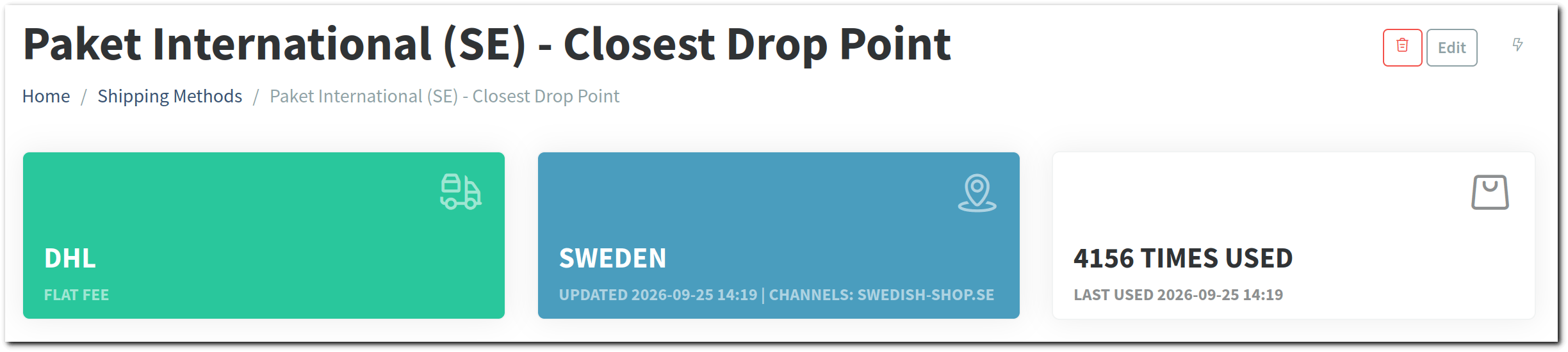
Database & Model Attributes
The shipping_methods table and models have been extended with two new fields:
usage_count(int, default0): Tracks the total number of times the shipping method has been used in completed orders.last_usage_at(Carbon|null, nullable datetime): Stores the timestamp of the most recent order placed using this shipping method.
In the Foundation module, the Vanilo\Foundation\Models\ShippingMethod model implements the Buyable interface and provides the addSale(Carbon $date, int|float $units = 1) and removeSale(int|float $units = 1) methods to mutate these stats.
Domain Events & Listener Integration
The usage counter and last used timestamp are updated automatically via domain event handling upon order placement:
- Domain Event: When an order is created, the
OrderWasCreatedevent is dispatched. - Listener: The
UpdateSalesFigureslistener handles the event and processes sales figure updates, resolving the sale date from$order->ordered_at ?? $order->created_at. - Resilience: The listener wraps updates in a
try...catchblock, ensuring that any statistical calculation anomaly is logged without disrupting the order processing pipeline.
Support for Both Shipping Fee Modes
The listener automatically detects and adapts to the active shipping fee architecture:
1. Line-Based Shipping Fees (foundation.use_shipping_lines)
When shipping fees are modeled as order line items:
UpdateSalesFiguresdetects the shipping line item during line iteration.- It invokes
$item->product->addSale($saleDate, $item->quantity). - If an order item is refunded/removed with negative quantities,
$item->product->removeSale()balances the count.
2. Adjustment-Based Shipping Fees
When using the default adjustment-based mode without dedicated shipping order lines:
- If no shipping line item is detected, the listener inspects
$order->shipping_method_idand loads the associated$order->shippingMethodrelation. - If the model implements
Buyable(such as Foundation'sShippingMethod), it triggers$shippingMethod->addSale($saleDate). - For base
ShippingMethodmodels withoutBuyable, it performs a direct model update:
$shippingMethod->update([
    'usage_count' => $shippingMethod->usage_count + 1,
    'last_usage_at' => $saleDate,
]);
Rounding Configuration
Calculating prices, discounts, and taxes in e-commerce often demands precise control over rounding behavior. Depending on regional accounting standards or store configurations, rounding might need to occur at standard currency precision (2 decimals), extended micro-precision (e.g., 4 or 6 decimals to prevent cumulative rounding discrepancies in line items), or differ between individual items and aggregate totals.
To centralize and customize precision rules across the framework, Vanilo introduces the static Vanilo\Support\Rounding service.
How the Rounding Class Works
Rounding is an in-memory singleton configuration registry and rounding utility. It determines decimal precision based on two dimensions:
RoundingTarget:
adjustment- which applies to adjustments (discounts, taxes, shipping fees, etc.).*(anything else, at the moment)
RoundingLevel:
line- Precision applied at line-item level.aggregate— Precision applied to aggregated totals.*- Wildcard level applying to any other scope.
Configuring Rounding Rules
You can configure precision rules during application boot (e.g., in a service provider) using setRoundingRuleFor():
use Vanilo\Support\Models\RoundingLevel;
use Vanilo\Support\Models\RoundingTarget;
use Vanilo\Support\Rounding;

// Set 4-decimal precision for all adjustment calculations
Rounding::setRoundingRuleFor(RoundingTarget::Adjustment, RoundingLevel::Any, 4);

// Set 4-decimal precision specifically for line items, keeping 2 decimals for aggregates
Rounding::setRoundingRuleFor(RoundingTarget::Adjustment, RoundingLevel::Line, 4);
Rounding::setRoundingRuleFor(RoundingTarget::Adjustment, RoundingLevel::Aggregate, 2);

// Direct calculation helper
$rounded = Rounding::roundAdjustment(14.52987, RoundingLevel::Line); // 14.5299
System Components Using Rounding
Several core modules in the framework leverage the Rounding service:
The RoundsAdjustments Trait
Adjusters use this trait to easily round adjustment values according to the active Rounding ruleset.
It exposes the following helper methods:
round(float $value, RoundingLevel $level = RoundingLevel::Any, ?AdjustmentType $type = null): floatroundTax(float $value, RoundingLevel $level = RoundingLevel::Any): floatroundPromotion(float $value, RoundingLevel $level = RoundingLevel::Any): float
Adjuster Implementations
PercentDiscount: Calculates promotion adjustments and rounds the resulting deduction usingroundPromotion().SimpleTax: Calculates tax adjustment amounts and rounds usingroundTax().SimpleTaxDeduction: Calculates tax deduction amounts and rounds usingroundTax().
The Taxes Module
Tax calculators (such as DefaultTaxCalculator and DeductiveTaxCalculator) rely on the tax adjusters,
inheriting the precision configured in Rounding for tax amounts.
Example: Implementing Rounding in Custom Adjusters
You can use the RoundsAdjustments trait in custom adjusters to respect system-wide rounding rules:
namespace App\Adjusters;

use Vanilo\Adjustments\Contracts\Adjustable;
use Vanilo\Adjustments\Contracts\Adjuster;
use Vanilo\Adjustments\Contracts\Adjustment;
use Vanilo\Adjustments\Support\RoundsAdjustments;
use Vanilo\Support\Models\RoundingLevel;

final class CustomFeeAdjuster implements Adjuster
{
    use RoundsAdjustments;

    public function calculateAmount(Adjustable $adjustable): float
    {
        $rawAmount = $adjustable->preAdjustmentTotal() * 0.035;

        // Automatically applies RoundingTarget::Adjustment rule
        return $this->round($rawAmount, RoundingLevel::Line);
    }
}
Taxon Improvements
The Category module received several enhancements to improve tree navigation, status control, and model-level taxon retrieval.
Taxon Deactivation & Scopes
The Taxon model now has an is_active boolean field (defaults to true). This allows disabling individual taxons (categories) without deleting records or breaking historical references.
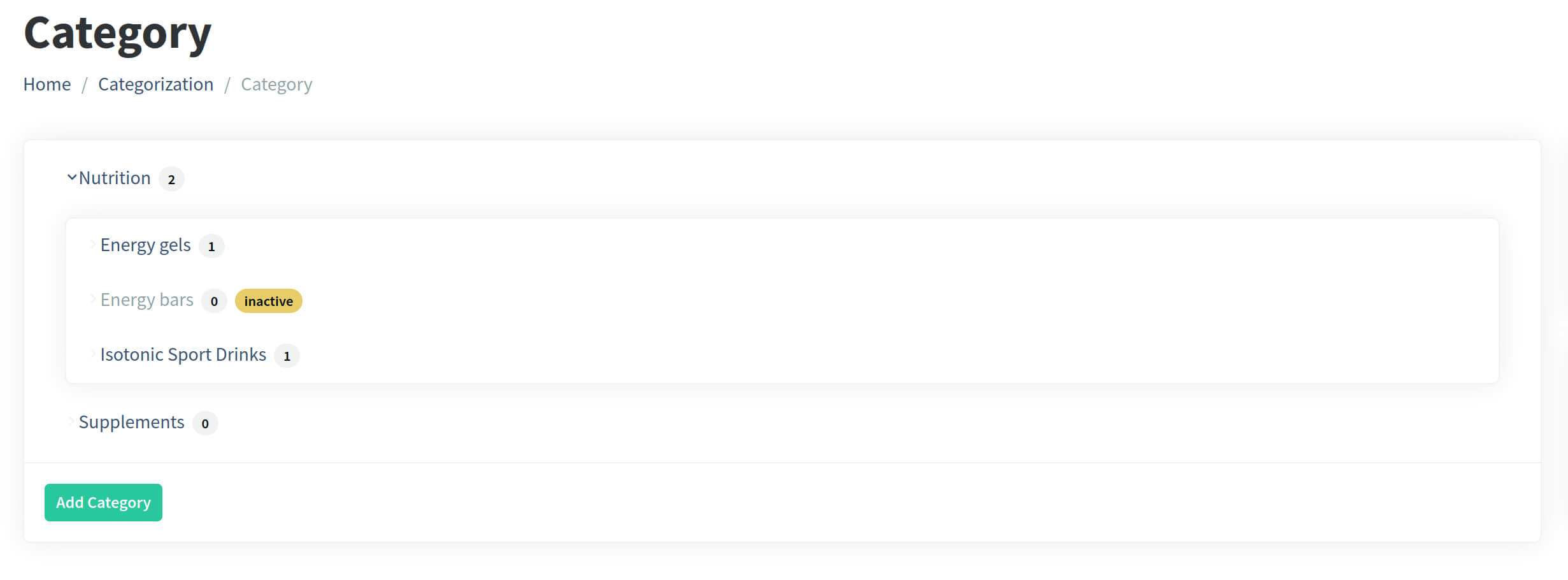
Two query scopes have been introduced to streamline filtering:
Taxon::activeOnes(): scopes the query to active recordsTaxon::inactives(): scopes the query to inactive records
Taxonomy::activeRootLevelTaxons()
The Taxonomy model has the rootLevelTaxons() method for years, which returns all the root level taxons, regardless
of the active/inactive state.
Vanilo 6 introduces the activeRootLevelTaxons(): Collection method, which als queries only top-level taxons, that are active, automatically sorted by priority.
$categories = Taxonomy::findOneBySlug('categories');
$rootTaxons = $categories->activeRootLevelTaxons();
Taxon::activeChildren Relationship
The $taxon->children relationship returns all the children of a given taxon, regardless of the active/inactive state.
Vanilo 6 comes with the Taxon::activeChildren(): HasMany relationship.
It loads only active immediate children (parent_id = $taxon->id where is_active = true), ordered by priority.
This eliminates manual filtering when traversing category trees for navigation menus and sidebars.
foreach ($taxon->activeChildren as $child) {
    // only active child taxons ordered by priority
}
taxonsIn() and firstTaxonIn() on HasTaxons
Models using the HasTaxons trait (such as Product or MasterProduct) now provide convenient helper methods to
retrieve assigned taxons for a specific taxonomy:
taxonsIn(string|Taxonomy $taxonomy, bool $withInactive = false): Collection: returns all assigned taxons within the specified taxonomy (passed as aTaxonomyinstance or slug). By default, only active taxons are returned.firstTaxonIn(string|Taxonomy $taxonomy, bool $withInactive = false): ?Taxon: returns the first assigned taxon in the specified taxonomy, filtering out inactive ones unless explicitly requested.
// Retrieve the primary brand or category
$brand = $product->firstTaxonIn('brands');

// Retrieve all active categories assigned to the product
$productCategories = $product->taxonsIn('categories');

// Include inactive taxons if needed
$allTaxons = $product->taxonsIn('categories', withInactive: true);
Blade Usage Example
The taxon retrieval methods that existed up until Vanilo 5.2 still return both active and inactive taxons.
In order to filter out the inactive entries (typically needed for the frontend), you need to use the new
activeRootLevelTaxons() and activeChildren accessors.
Below is a simplified Blade snippet showing how to render a multi-level navigation menu that hides inactive taxons:
<ul>
    @foreach($categories->activeRootLevelTaxons() as $category)
        <li>
            <a href="{{ url_of($category) }}">{{ $category->name }}</a>

            @if($category->activeChildren->isNotEmpty())
                <ul>
                    @foreach($category->activeChildren as $subCategory)
                        <li>
                            <a href="{{ url_of($subCategory) }}">{{ $subCategory->name }}</a>

                            @if($subCategory->activeChildren->isNotEmpty())
                                <ul>
                                    @foreach($subCategory->activeChildren as $leaf)
                                        <li>
                                            <a href="{{ url_of($leaf) }}">{{ $leaf->name }}</a>
                                        </li>
                                    @endforeach
                                </ul>
                            @endif
                        </li>
                    @endforeach
                </ul>
            @endif
        </li>
    @endforeach
</ul>
Property Info Fields
The properties table now has two new optional text fields: excerpt and description.
excerpt: Intended for short summaries, helper hints, or UI tooltips (e.g., explaining abbreviated or cryptic attribute codes such as what"H135"means for an ice cream vitrine).description: Supports longer, detailed content such as sizing charts, measurement specifications, rich markdown/HTML guides, or comprehensive property documentation.
Previously, Property definitions were limited to their identifying name, slug, type, and configuration payload,
requiring developers to store descriptive UI metadata or attribute explanations elsewhere
(such as within unstructured configuration JSON payloads or custom schema extensions).
With first-class excerpt and description attributes:
- Storefront UX & Tooltips: Effortlessly render contextual popovers, infotip badges, and attribute help cards across PDPs (Product Detail Pages) and filter sidebars without extra relational queries or ad-hoc JSON parsing.
- Specification Sheets & Sizing Guides: Embed extensive property explanations or sizing charts directly within the catalog schema alongside technical attributes.
The Withdrawn Order State
Under European Union consumer protection directives, consumers shopping online have a statutory cooling-off period of at least 14 calendar days to withdraw from distance purchase contracts without providing justification.
To support compliance and domain separation between regular merchant/system cancellations and customer-initiated revocations, Vanilo now provides first-class support for order withdrawals along with dedicated lifecycle events.
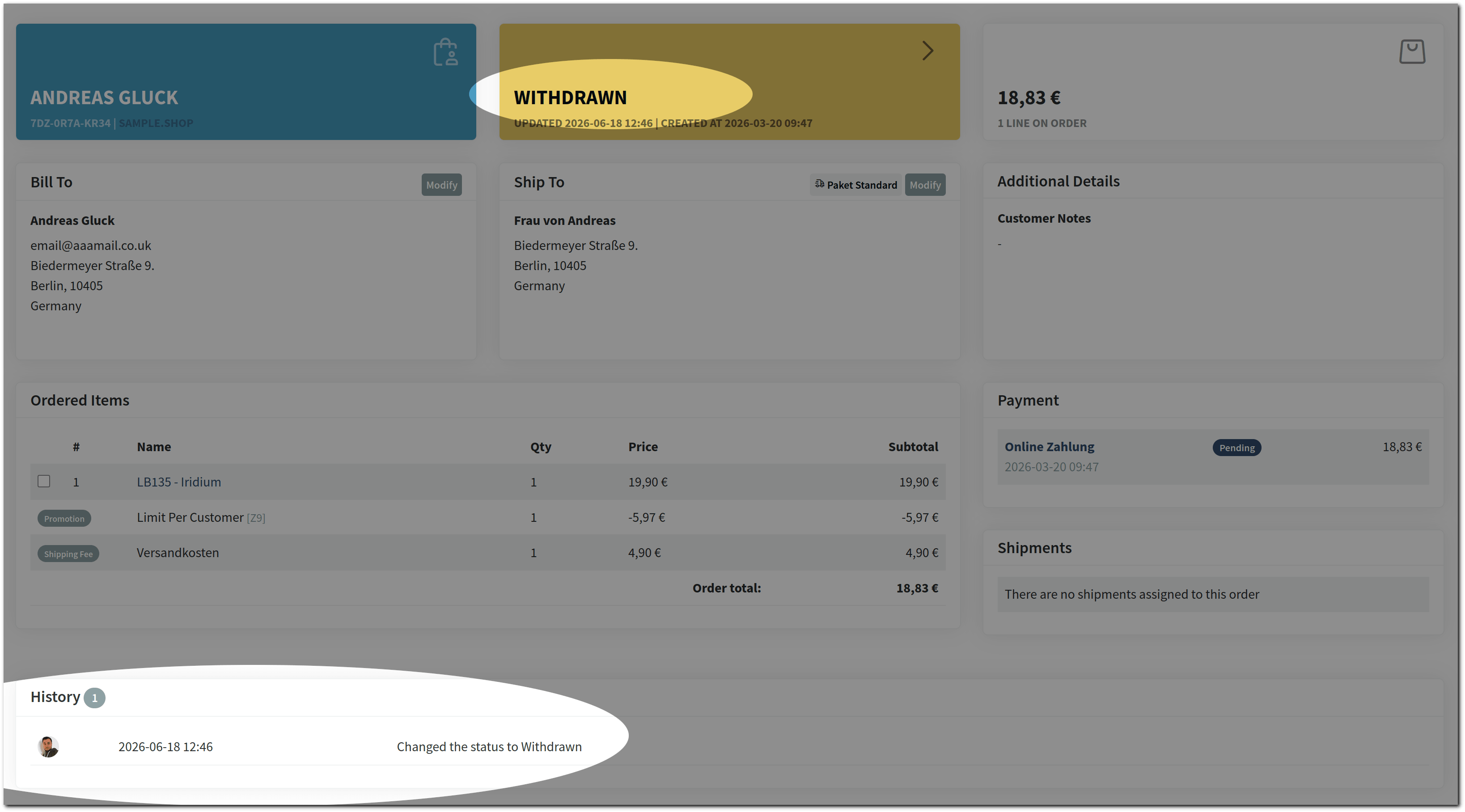
Key Additions & Technical Overview
The OrderStatus enum now includes the withdrawn state (OrderStatus::WITHDRAWN).
Developers can utilize both property-based and method-based enum helpers:
- Property access:
$order->status->is_withdrawn - Method access:
$order->status->isWithdrawn() - Enum instantiation:
OrderStatus::WITHDRAWN()
The OrderWasWithdrawn & OrderStateChangedToPending domain events.
To enable reactive workflows in event-driven architectures (such as triggering automated refund pipelines,
ERP stock releases, return shipping label creation, or audit logs), two new domain events were introduced in Vanilo\Order\Events:
OrderWasWithdrawn: Dispatched when an order transitions into the withdrawn state by a customer exercising their statutory right of withdrawal.OrderStateChangedToPending: Dispatched when an order state is set or reverted back topending.
Implementation Example: Customer Self-Service Withdrawal
With the enum helper properties and date calculations, exposing an EU-compliant self-service order withdrawal action in the customer portal / account dashboard requires just a few lines in your Blade template:
@if(!$order->status->is_withdrawn && $order->ordered_at->diffInDays() < 14)
    {!! Form::model($order, ['route' => ['shop.account.order.update', $order], 'method' => 'PATCH']) !!}
    {{ Form::hidden('status', 'withdrawn') }}
    @csrf

    <button type="submit" class="btn-primary w-full">
        {{ __('Withdraw') }}
    </button>
    {!! Form::close() !!}
@endif
The controller action (simplified):
public function update(UpdateOrderRequest $request, Order $order)
{
    if ($request->isEmptyRequest()) {
        flash()->warning(__('Nothing to update'));
    } elseif ($request->isAnOrderWithdrawalRequest()) {
        $order->status = OrderStatus::WITHDRAWN;
        $order->save();

        event(new OrderWasWithdrawn($order));

        flash()->info(__('Your request to withdraw order :number has been accepted. We will process it as soon as possible and inform you about the status.', ['number' => $order->number]));
    }

    return redirect()->back();
}
Listening to OrderWasWithdrawn in your application allows downstream listeners to decouple cancellation logistics,
notification dispatches, and payment gateway refunds cleanly from the HTTP layer.
Tax & Promotion Calculation Improvements
- Changed the order of tax and promotion calculations so that promotions are applied before taxes
- Changed the Tax adjusters to take the adjusted amount as base for the tax calculation, thus taking discounts and other adjustments into account.